

2025 Correct and Up-to-date Microsoft SC-401 BrainDumps
Current SC-401 dumps Preparation through Our Practice Test
NEW QUESTION # 73
You have a Microsoft 365 E5 tenant that contains a user named User1. User1 is assigned the Compliance Administrator role. User1 cannot view the regular expression in the IP Address sensitive info type. You need to ensure that User! can view the regular expression. What should you do?
- A. Assign User1 the Global Reader role.
- B. Assign Used to the Reviewer role group
- C. Instruct User1 to use the Test function on the sensitive info type.
- D. Create a copy of the IP Address sensitive info type and instruct User1 to edit the copy.
Answer: D
Explanation:
Step 1 - Problem statement
User1 has the Compliance Administrator role but cannot view the regular expression in the built-in IP Address sensitive info type.
This is expected because:
Microsoft provides a large set of built-in sensitive info types (SITs).
For these built-in SITs, the underlying regular expressions, keywords, or detection logic are not exposed to administrators for security reasons.
As a result, even with Compliance Administrator privileges, User1 cannot directly see or modify the regex in the built-in IP Address SIT.
Step 2 - Microsoft solution
To view or modify the regex:
You must create a copy of the built-in SIT.
Once copied, the new custom SIT allows you to edit and view the regex and supporting elements.
This is the only supported way to customize or examine the detection logic.
# Reference: Create a custom sensitive information type
"You can't directly modify the definitions of built-in sensitive information types, but you can create a copy of an existing SIT and then edit it." Step 3 - Why not the other options?
A). Reviewer role group # Reviewers are for records management/discovery, not SIT regex visibility.
C). Test function # Allows you to test SIT detection but does not reveal the regex.
D). Global Reader role # Read-only access, does not expose regex definitions either.
NEW QUESTION # 74
You have a Microsoft 365 E5 subscription that uses Microsoft Purview.
You are evaluating the use of custom data assessment scans to identify the potential oversharing of data in the subscription.
What is the maximum number of items the data assessments can support per location?
- A. 50.000
- B. 100.000
- C. 200.000
- D. 500.000
Answer: C
Explanation:
Comprehensive Detailed Explanation with References
Custom Data Access Governance (DAG) data assessment scans in Microsoft Purview can be run on selected SharePoint Online or OneDrive locations to check for oversharing and exposure. Each custom assessment scan supports up to 200,000 items per location. This cap is documented in Microsoft's guidance for custom data access governance assessments.
NEW QUESTION # 75
HOTSPOT
How many files in Site2 can User1 and User2 access after you turn on DLPpolicy1? To answer, select the appropriate options in the answer area.
NOTE: Each correct selection is worth one point.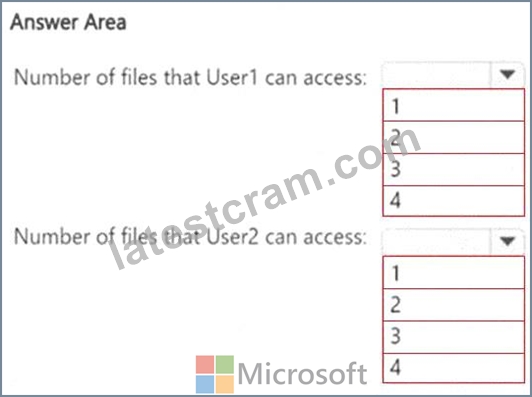
Answer:
Explanation: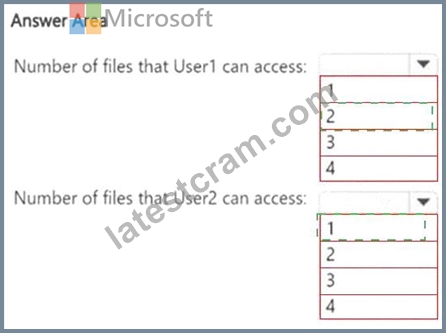
Explanation:
A screenshot of a computer AI-generated content may be incorrect.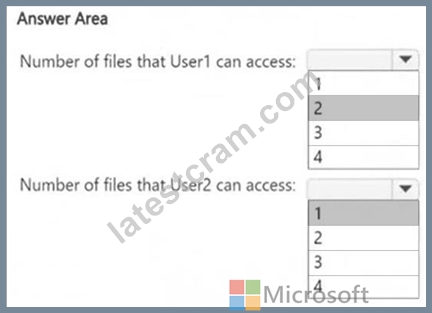
Understanding DLP Policy Impact on File Access
The DLP policy (DLPpolicy1) applies to Site2 and restricts access when:
# Content contains SWIFT Codes.
# Instance count is 2 or more.
File Analysis (Based on SWIFT Codes Count)
A screenshot of a computer AI-generated content may be incorrect.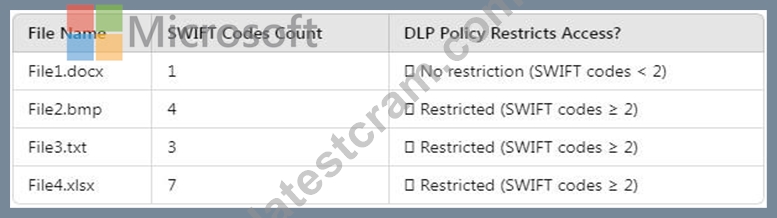
Files that remain accessible (not restricted by DLP):
# File1.docx (Contains only 1 SWIFT Code # Below restriction threshold) User access after DLP policy is applied:
A screenshot of a computer AI-generated content may be incorrect.
User1 (Site Owner):
# Has higher privileges and can override DLP restrictions (through admin intervention).
# Can access 2 files (File1.docx + override access to another file).
User2 (Site Visitor):
# Has read-only access but DLP blocks access to restricted files.
# Can only access 1 file (File1.docx), since all others are restricted.
NEW QUESTION # 76
DRAG DROP
You have a Microsoft 365 E5 subscription that has data loss prevention (DLP) implemented.
You need to create a custom sensitive info type. The solution must meet the following requirements:
# Match product serial numbers that contain a 10-character alphanumeric string.
# Ensure that the abbreviation of SN appears within six characters of each product serial number.
# Exclude a test serial number of 1111111111 from a match.
Which pattern settings should you configure for each requirement? To answer, drag the appropriate settings to the correct requirements. Each setting may be used once, more than once, or not at all. You may need to drag the split bar between panes or scroll to view content.
NOTE: Each correct selection is worth one point.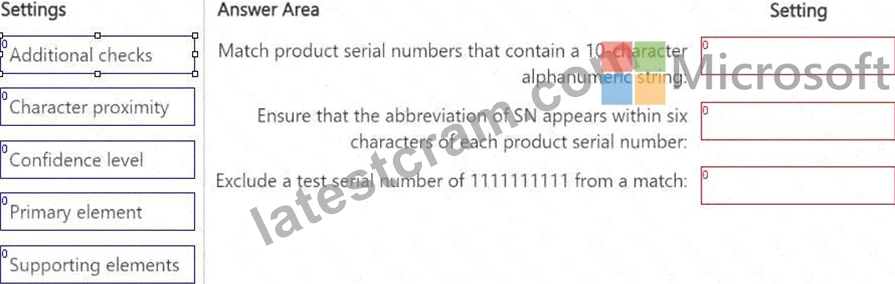
Answer:
Explanation: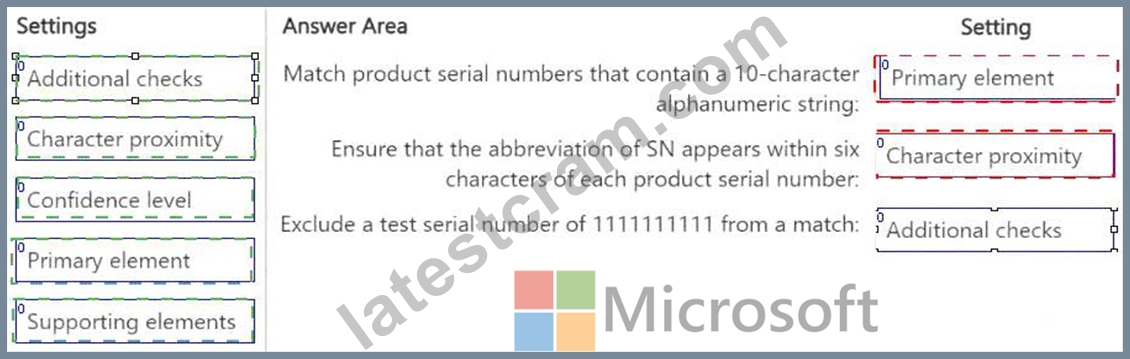
Explanation: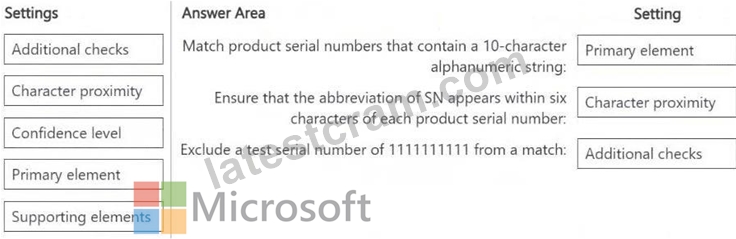
NEW QUESTION # 77
You have two Microsoft 365 subscriptions named Contoso and Fabrikam. The subscriptions contain the users shown in the following table.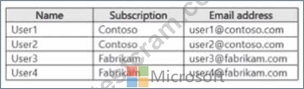
You have a sensitivity label named Sensitivity! as shown in the exhibit. (Click the Exhibit tab) you have the files shown in the following table.
For each of the following statements, select yes if the statement is true. Otherwise select No.
NOTE: Each correct selection is worth one point.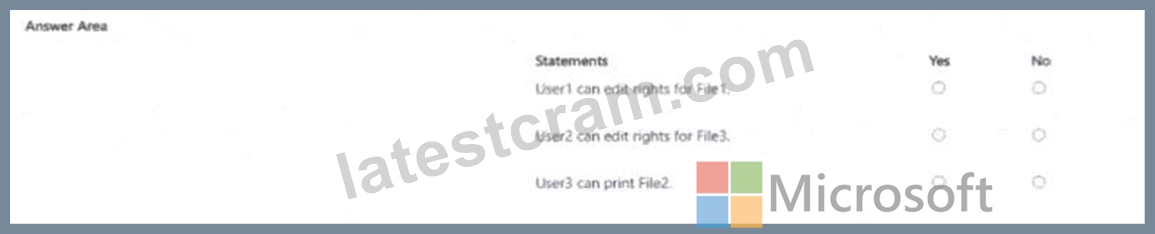
Answer:
Explanation: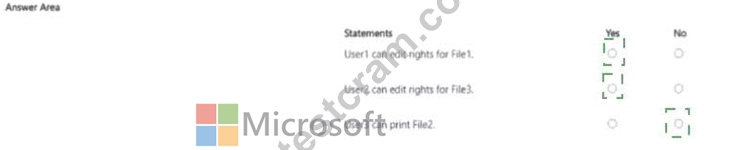
Explanation:
Yes , Yes, No
To determine whether each statement is true or false, let's analyze the provided information step by step based on the sensitivity label settings and the user permissions associated with the files.
Given Information:
Users and Subscriptions:
User1: Contoso subscription, email: [email protected]
User2: Contoso subscription, email: [email protected]
User3: Fabrikam subscription, email: [email protected]
User4: Fabrikam subscription, email: [email protected]
Files and Sensitivity Label Application:
File1: Automatically applied Sensitivity1 using an auto-labeling policy File2: Applied by User2 File3: Applied by User1 Sensitivity Label (Sensitivity1) Assumptions: Since the exhibit for the sensitivity label is not fully detailed, we need to make reasonable assumptions based on typical Microsoft 365 sensitivity label behavior.
Sensitivity labels can restrict access based on user permissions, subscription boundaries, or specific configurations (e.g., allowing only users within the same organization to edit or view). Given the context of two separate subscriptions (Contoso and Fabrikam), it's likely that Sensitivity1 restricts access to users within the same subscription unless explicitly configured otherwise. A common default for such labels is to allow editing and other rights only to users within the applying user's organization, with possible restrictions for cross-subscription access.
Key Assumptions:
Sensitivity1 likely encrypts the files and restricts editing rights to users within the same subscription as the user who applied the label or where the auto-labeling policy is configured.
File1 (auto-applied) would inherit permissions based on the policy, likely restricting access to Contoso users if the policy is set up within the Contoso subscription.
File2 (applied by User2 from Contoso) would restrict access to Contoso users.
File3 (applied by User1 from Contoso) would also restrict access to Contoso users.
Users from Fabrikam (User3, User4) would not have edit rights unless explicitly granted, which is unlikely given the separation of subscriptions.
Statement Analysis:
User1 can edit rights for File1.
File1 was automatically applied with Sensitivity1 using an auto-labeling policy. Since the policy is likely configured within the Contoso subscription (where User1 resides), User1, as a Contoso user, should have edit rights unless the policy explicitly restricts this. Given User1's affiliation with Contoso, this is typically allowed.
# Answer: Yes
User2 can edit rights for File3.
File3 was applied by User1, who is from the Contoso subscription. Since User2 is also from the Contoso subscription, they should have edit rights unless the label configuration explicitly denies this for other users within the same subscription. Typically, users within the same organization can edit files labeled by another user from the same organization.
# Answer: Yes
User3 can print File2.
File2 was applied by User2, who is from the Contoso subscription. Sensitivity1 likely restricts access to Contoso users only. User3 is from the Fabrikam subscription, which is a separate entity. Unless cross-sub Answer : No
NEW QUESTION # 78
You have a Microsoft 36S E5 subscription that has a Microsoft Purview exact data match (EDM) classifier named EDM1.
You plan to create the Microsoft Purview policies shown in the following table.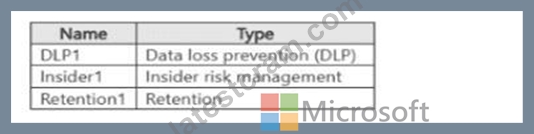
Which policies can use EDM1?
- A. DLP1. Insider1, and Retention1
- B. Retention 1 only
- C. DLP1 only
- D. DLP1 and Insider1 only
- E. Insider1 and Retention1 only
Answer: C
Explanation:
Comprehensive Detailed Explanation with References
Exact Data Match (EDM) classifiers are designed to identify highly sensitive structured data (like customer IDs, account numbers) with higher accuracy.
EDM classifiers can only be used within Data Loss Prevention (DLP) policies in Microsoft Purview.
They cannot be used in Insider Risk Management or Retention policies.
Reference: EDM classifiers in Microsoft Purview
"EDM sensitive information types can only be used in data loss prevention policies."
NEW QUESTION # 79
You need to meet the technical requirements for the Site1 documents.
Which three actions should you perform in sequence? To answer, move the appropriate actions from the list of actions to the answer area and arrange them in the correct order.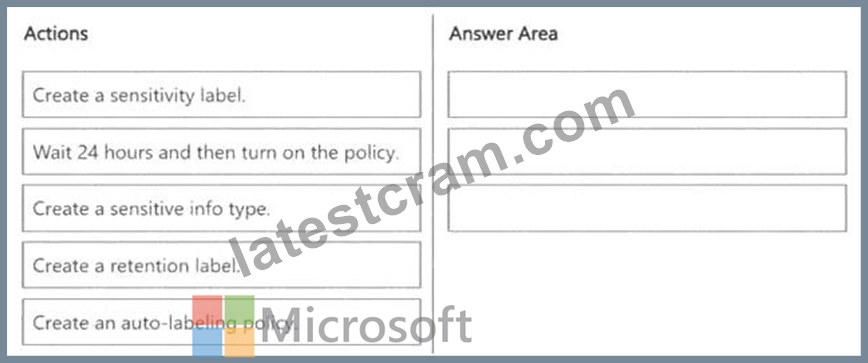
Answer:
Explanation: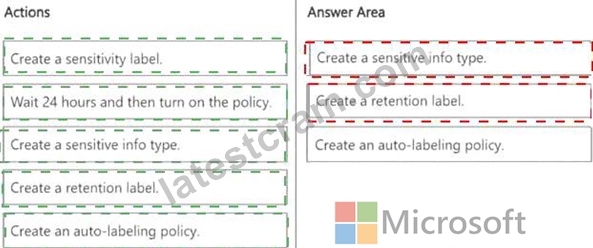
Explanation:
A screenshot of a questionnaire AI-generated content may be incorrect.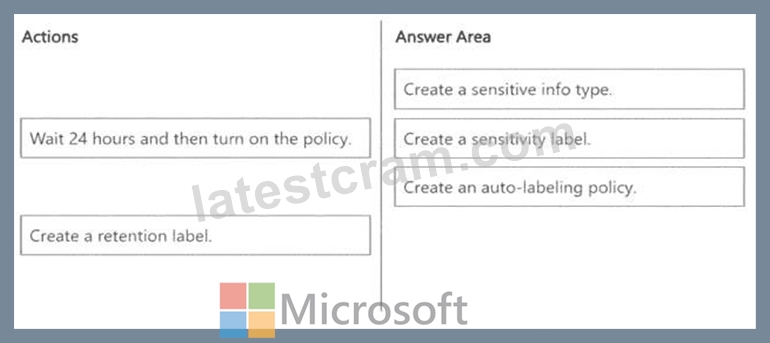
The goal is to automatically label documents in Site1 that contain credit card numbers. To achieve this, we need a sensitivity label with an auto-labeling policy based on a sensitive info type that detects credit card numbers.
Step 1: Create a Sensitive Info Type
# A sensitive info type is needed to detect credit card numbers in documents.
# Microsoft Purview includes built-in sensitive info types for credit card numbers, but we can also create a custom one if necessary.
Step 2: Create a Sensitivity Label
# A sensitivity label is required to classify and protect documents containing sensitive information.
# This label can apply encryption, watermarking, or access controls to credit card data.
Step 3: Create an Auto-Labeling Policy
# An auto-labeling policy ensures that the sensitivity label is applied automatically when credit card numbers are detected in Site1.
# This policy is configured to scan files and automatically apply the correct sensitivity label.
NEW QUESTION # 80
You need to provide a user with the ability to view data loss prevention (DIP) alerts in the Microsoft Purview portal. The solution must use the principle of least privilege.
Which role should you assign to the user?
- A. Security Operator
- B. Compliance Administrator
- C. Compliance Data Administrator
- D. Security Reader
Answer: D
Explanation:
The requirement is:
You need to provide a user with the ability to view DLP alerts in the Microsoft Purview portal. The solution must use the principle of least privilege.
Step 1 - Understanding the roles
Compliance Administrator # Full access to compliance features, including creating/editing policies. This is more than needed (not least privilege).
Compliance Data Administrator # Can manage compliance features and data governance, but still more permissions than required.
Security Operator # Can view and respond to active security incidents and alerts, which is more than just viewing DLP alerts.
Security Reader # Read-only access to security-related features, including viewing DLP alerts, Microsoft Purview alerts, incidents, reports, and recommendations. This matches the requirement precisely.
Step 2 - Microsoft Documentation
Microsoft Learn states:
Security Reader role:
"Can view and investigate security events, reports, and alerts without the ability to make changes."
# Reference: Microsoft Entra built-in roles - Security Reader
Step 3 - Apply the principle of least privilege
Since the user only needs to view DLP alerts (not create or manage policies), the Security Reader role is the minimal role with sufficient permissions.
NEW QUESTION # 81
You have a Microsoft 365 E5 subscription.
You need to create static retention policies for the following locations:
*Teams chats
*Exchange email
*SharePoint sites
*Microsoft 365 Groups
*Teams channel messages
What is the minimum number of retention policies required?
- A. 0
- B. 1
- C. 2
- D. 3
- E. 4
Answer: A
Explanation:
In Microsoft Purview Data Lifecycle Management, different Microsoft 365 locations require separate retention policies because they fall under different storage and compliance models.
Teams Chats & Teams Channel Messages (1 Policy) require a separate retention policy because Teams messages are stored differently than Exchange and SharePoint content. One policy can cover both Teams chats and Teams channel messages. Exchange Email (1 Policy) requires its own separate policy since emails are managed differently than Teams or SharePoint content. SharePoint Sites & Microsoft 365 Groups (1 Policy) are both stored in SharePoint Online, so they can be managed under one policy.
NEW QUESTION # 82
You have a Microsoft 365 tenant.
A new regulatory requirement states that all documents containing a patent ID be labeled, retained for 10 years, and then deleted. The policy used to apply the retention settings must never be disabled or deleted by anyone.
You need to implement the regulatory requirement.
Which three actions should you perform in sequence? To answer, move the appropriate actions from the list of actions to the answer area and arrange them in the correct order.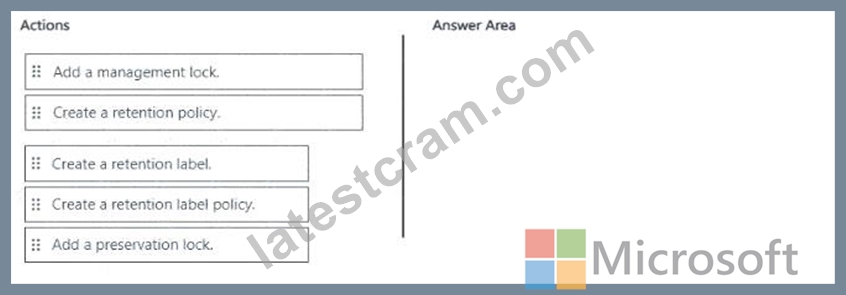
Answer:
Explanation: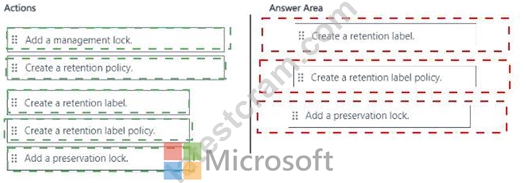
Explanation: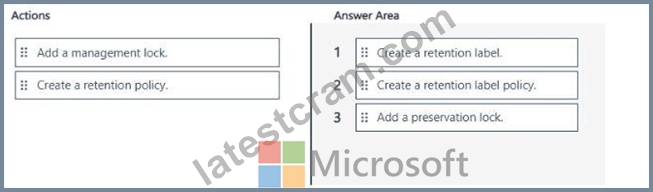
NEW QUESTION # 83
You have a Microsoft 365 E5 subscriptions.
You deploy Microsoft Purview Data Security Posture Management for Al (DSPM for Al).
You need to edit the default policies created as part of the deployment.
Which two Microsoft Purview solutions should you use? Each correct answer presents part of the solution.
NOTE: Each correct selection is worth one point.
- A. Data Loss Prevention
- B. Information Protection
- C. Insider Risk Management
- D. Compliance Manager
- E. Data Lifecycle Management
- F. DSPMforAI
- G. Information Barriers
Answer: A,B
NEW QUESTION # 84
You have a Microsoft 365 ES subscription that uses Microsoft Teams and contains the users shown in the following table.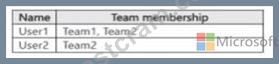
You have the retention policies shown in the following table.
The users perform the actions shown in the following table.
For each of the following statements, select Yes if the statement is true. Otherwise, select No.
NOTE: Each correct selection is worth one point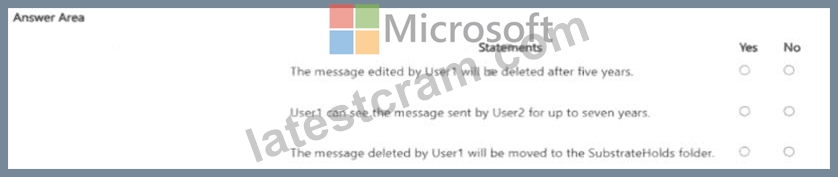
Answer:
Explanation: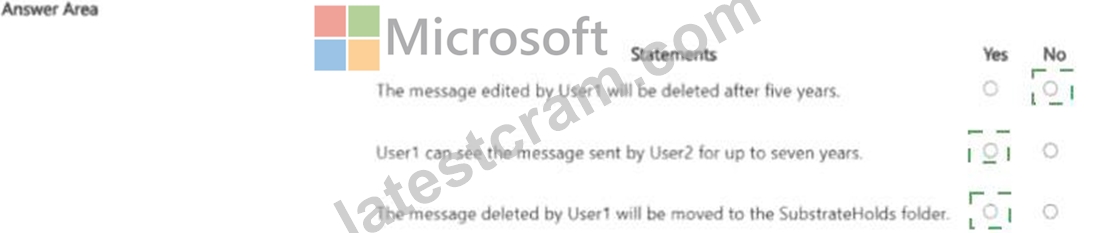
Explanation: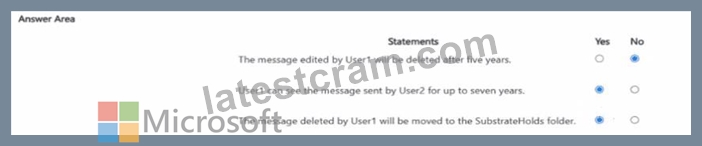
NEW QUESTION # 85
DRAG DROP
You have a Microsoft 365 subscription that contains 20 data loss prevention (DLP) policies.
You need to identify the following:
# Rules that are applied without triggering a policy alert
# The top 10 files that have matched DLP policies
# Alerts that are miscategorized
Which report should you use for each requirement? To answer, drag the appropriate reports to the correct requirements. Each report may be used once, more than once, or not at all. You may need to drag the split bar between panes or scroll to view content.
NOTE: Each correct selection is worth one point.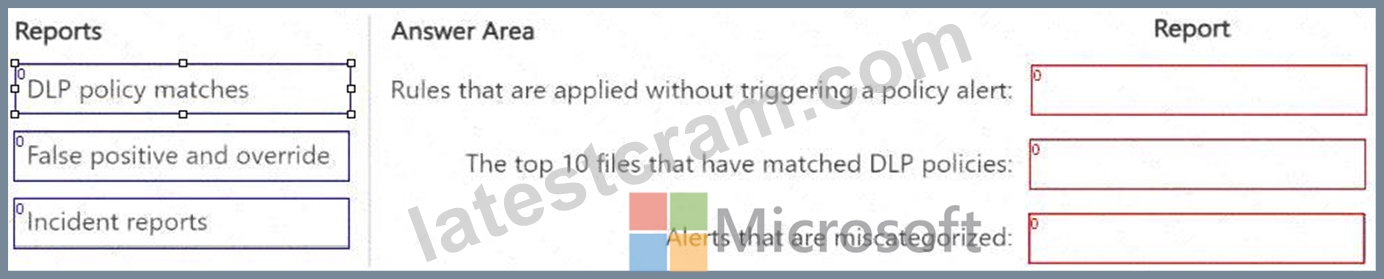
Answer:
Explanation: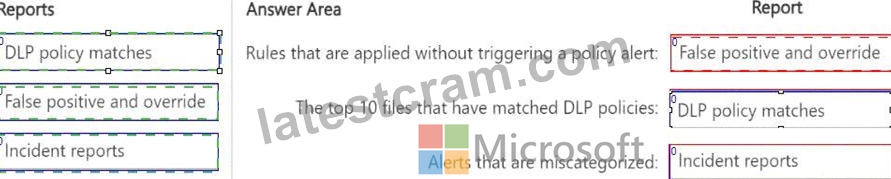
Explanation: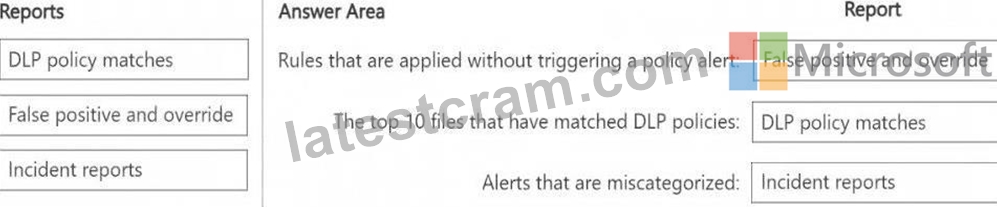
The False positive and override report helps identify rules that were applied but did not generate an actual policy alert, which means they were overridden or deemed false positives.
The DLP policy matches report provides details on files that matched DLP policies, including the top 10 files.
The Incident reports report helps analyze and review alerts, including those that may have been miscategorized.
NEW QUESTION # 86
You are implementing Microsoft Purview Advanced Message Encryption for a Microsoft 365 tenant named contoso.com You need to meet the following requirements:
* All email to a domain named (abrikam.com must be encrypted automatically.
* Encrypted emails must expire seven days after they are sent
What should you configure for each requirement? To answer, select the appropriate options in the answer area.
NOTE: Each correct selection is worth one point.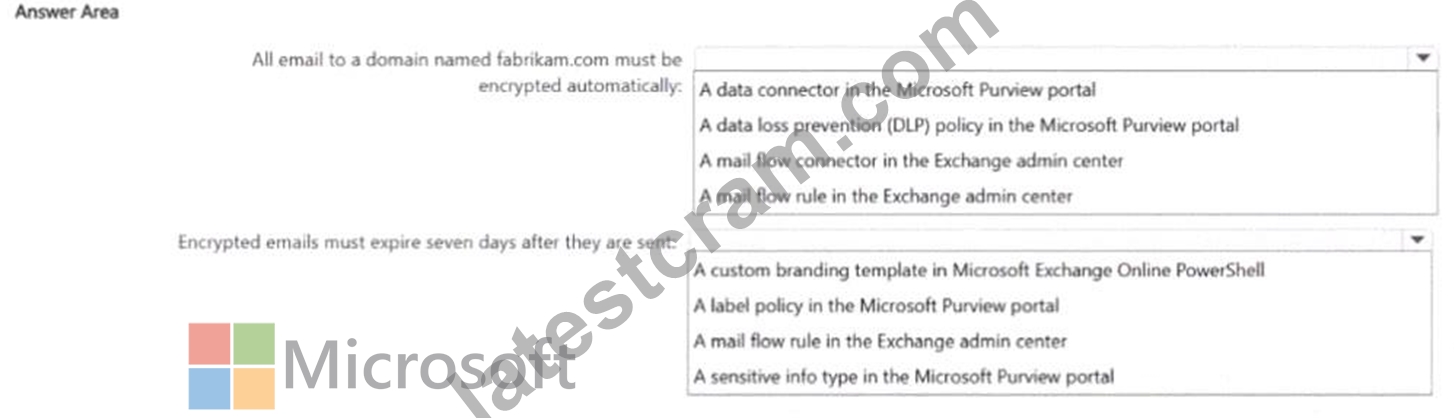
Answer:
Explanation: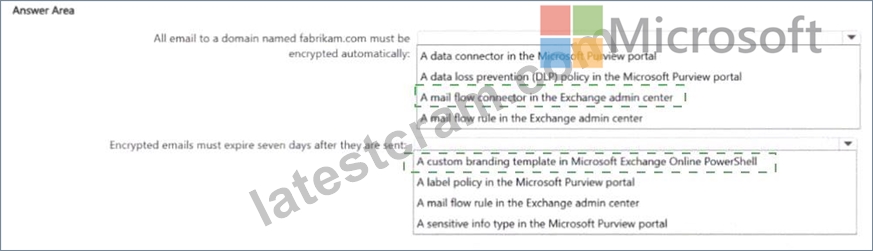
Explanation:
NEW QUESTION # 87
HOTSPOT
You have a Microsoft 365 E5 subscription that contains the device configurations shown in the following table.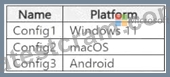
Each configuration uses either Google Chrome or Firefox as a default browser.
You need to implement Microsoft Purview and deploy the Microsoft Purview browser extension to the configurations.
To which configuration can each extension be deployed? To answer, select the appropriate options in the answer area.
NOTE: Each correct selection is worth one point.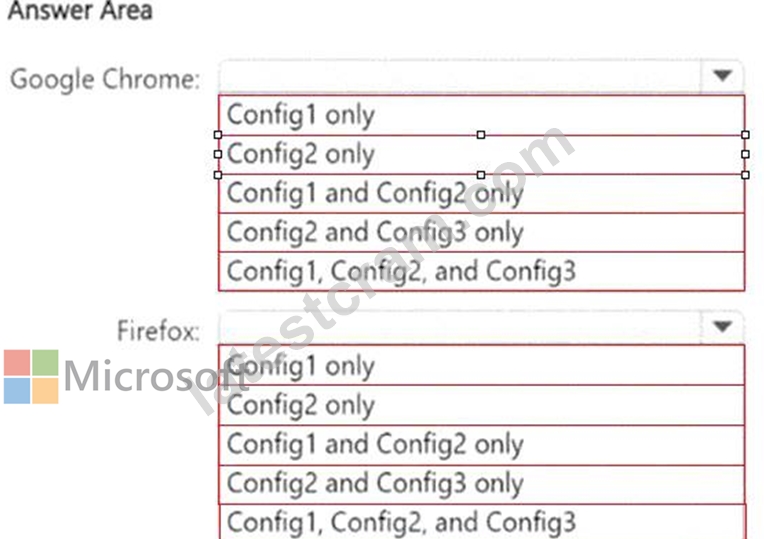
Answer:
Explanation: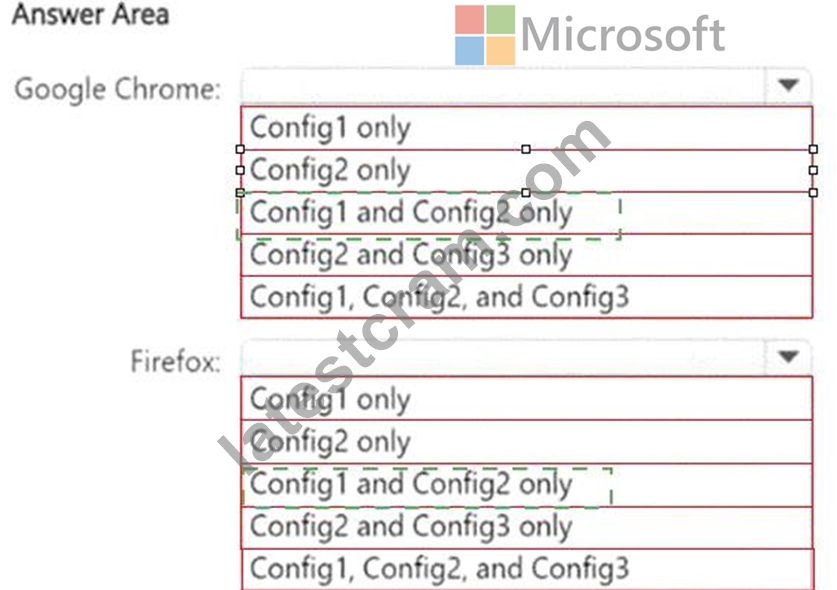
Explanation: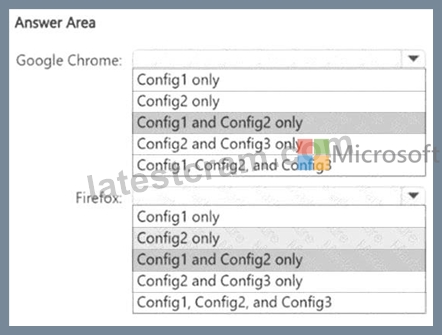
Microsoft Purview browser extensions for Endpoint DLP are supported on:
# Windows 10/11 (Config1)
# macOS (Config2)
# Not supported on Android (Config3)
Since Microsoft Purview does not support browser extensions on Android, Config3 is excluded from both Google Chrome and Firefox.
NEW QUESTION # 88
You have a Microsoft 365 E5 subscription that uses Microsoft Purview.
You are evaluating the use of custom data assessment scans to identify the potential oversharing of data in the subscription.
What is the maximum number of items the data assessments can support per location?
- A. 50.000
- B. 100.000
- C. 200.000
- D. 500.000
Answer: C
NEW QUESTION # 89
You have a Microsoft S65 E5 subscription that contains two users named User! and Admin1 Admin1 manages audit retention policies for the subscription.
You need to ensure that the audit logs of User1 will be retained for 10 years.
What should you do first?
- A. Assign a Microsoft Purview Audit (Premium) add on license to User1.
- B. Assign a Microsoft Purview Audit (Premium) add-on license to Admin1.
- C. Assign a 10 year audit log retention add-on license to Admin1.
- D. Assign a 10-year audit log retention add-on license to User1.
Answer: D
NEW QUESTION # 90
You have a Microsoft 36S ES subscription that contains a Windows 11 device named Device 1 and three users named User 1. User2. and User3.
You plan to deploy Azure Information Protection (AIP) and the Microsoft Purview Information Protection client to Device 1.
You need to ensure that the users can perform the following actions on Device1 as part of the planned deployment
* User 1 will test the functionality of the client.
* User2 will install and configure the Microsoft Rights Management connector.
* User3 will be configured as the service account for the information protection scanner.
The solution must maximize the security of the sign-in process for the users What should you do?
- A. Enable User1. User I and User 3 for passkey (FIDO2) authentication
- B. Enable User? and Usex3 for passwordless authentication.
- C. Exclude User1 and User? from multifactor authentication (Mf A}
- D. Exclude User2 and User3 from multifactor authentication (MfA).
Answer: A
Explanation:
Goal: maximize sign#in security for users who will test the AIP client (User1), install/configure the Microsoft Rights Management connector (User2), and act as the AIP scanner service account (User3).
Excluding users from MFA lowers security and is not recommended.
Passwordless with FIDO2 security keys (passkeys) provides strong phishing#resistant authentication and is fully supported for Azure AD sign#ins, including admin tasks and service scenarios that require interactive sign#in during setup.
Therefore, enabling all three for FIDO2 passkey authentication best meets the "maximize security" requirement.
References:
Microsoft Entra ID - Passwordless authentication with FIDO2 security keys
https://learn.microsoft.com/azure/active-directory/authentication/concept-authentication-passwordless
NEW QUESTION # 91
You have a Microsoft 365 £5 subscription.
You need to prevent the sharing of sensitive information in Microsoft Teams.
Which entities can you protect by applying a data loss prevention (DLP) policy to each resource? To answer, drag the appropriate activities to the correct entity. Each activity may be used once, more than once, or not at all. You may need to drag the split bar between panes or scroll to view content.
NOTE; Each correct selection is worth one point.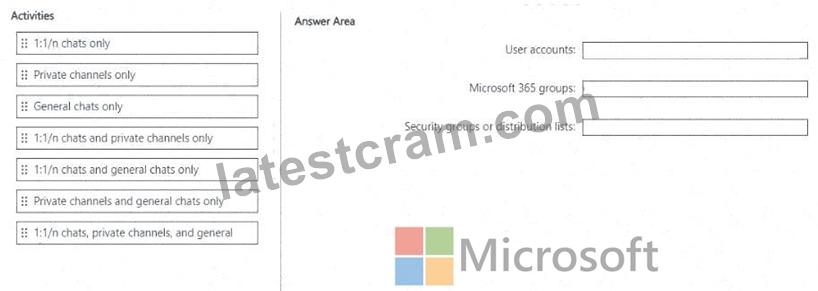
Answer:
Explanation: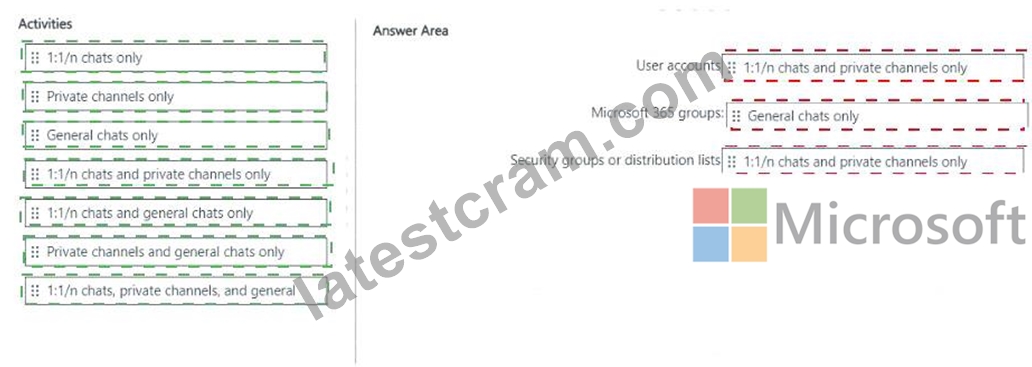
Explanation: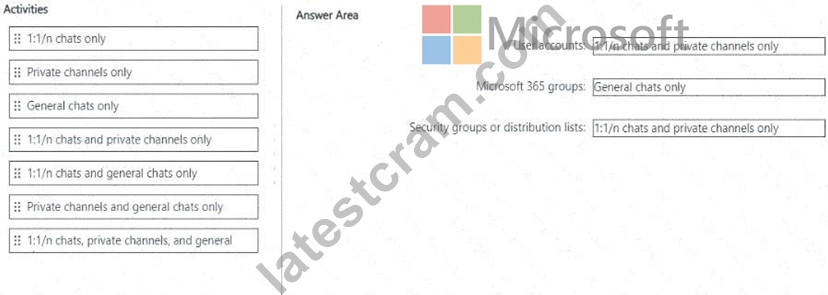
We are asked which Microsoft Teams activities can be protected by a DLP policy when applied to different resource scopes: user accounts, Microsoft 365 groups, and security groups or distribution lists.
Step 1 - How DLP applies in Teams
User accounts # Controls 1:1 or group chats (1:1/n chats).
Microsoft 365 groups # Controls Team channel messages (general and private channels).
Security groups or distribution lists # Used as a scoping mechanism for users, but only applies to 1:1/n chats, not to channel messages.
# Reference: Learn about DLP in Microsoft Teams
Step 2 - Map activities
User accounts # Can protect 1:1/n chats only.
Microsoft 365 groups # Can protect Private channels only and General chats only (both types of Teams channels).
NEW QUESTION # 92
You have a Microsoft J65 E5 subscription. You plan to implement retention policies for Microsoft Teams.
Which item types can be retained?
- A. voice memos from the Teams mobile client
- B. code snippets
- C. embedded images
Answer: B,C
Explanation:
The question is asking what item types can be retained when implementing Microsoft Teams retention policies in Microsoft 365 E5.
Retention policies in Teams can apply to:
Teams chat messages (1:1 or group chats)
Teams channel messages
Items within those messages, including text, links, and supported embedded objects.
Step 2 - Supported Teams retention items
According to Microsoft documentation:
Retention policies support Teams messages (chats and channel posts) and their associated attachments or in- line content such as:
Embedded images
Code snippets
Tables, links, and reactions
Retention policies do not support certain Teams items, including:
Voicemails
Calls and meetings recordings
Whiteboards
Message reactions (stored separately in Azure services)
Reference: Learn about retention for Teams in Microsoft Purview
Step 3 - Apply to options
A). Voice memos from the Teams mobile client # Not retained by retention policies.
B). Embedded images # Retained because they are part of Teams messages.
C). Code snippets # Retained because they are supported message content.
NEW QUESTION # 93
You have a Microsoft 365 E5 subscription.
You need to ensure that users are prevented from uploading sensitive data to ChatGPT and Google Gemini.
The solution must meet the following requirements:
* Prevent credit card numbers from being pasted into ChatGPT and Gemini.
* Prevent documents that contain classified data from being uploaded to ChatGPT and Gemini.
Which Microsoft Purview solution should you use for each requirement? To answer, select the appropriate options in the answer area.
NOTE: Each correct selection is worth one point.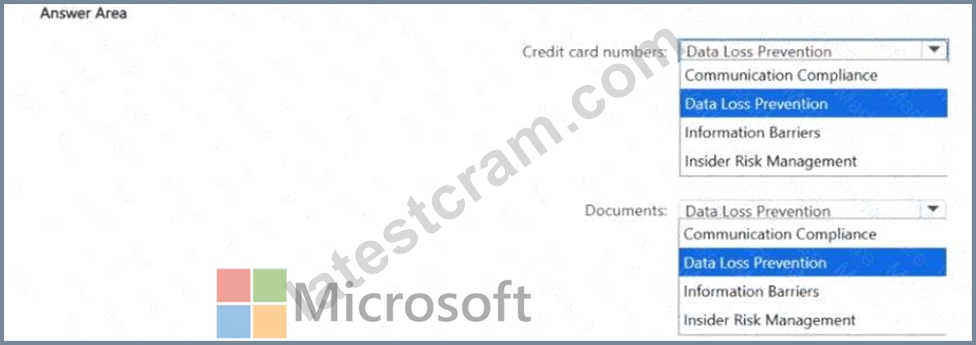
Answer:
Explanation: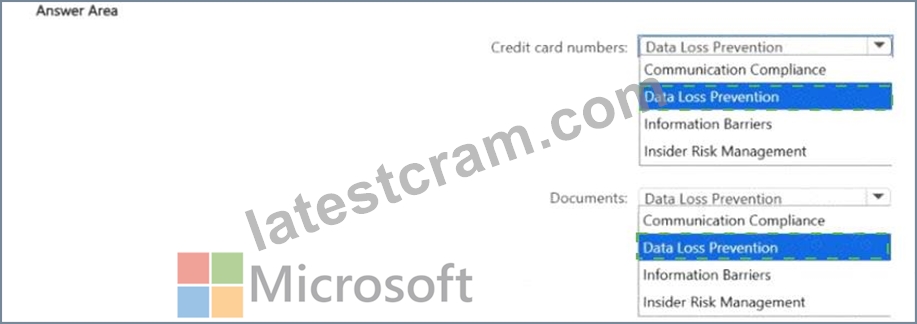
Explanation:
Step 1 - Requirement analysis
You need to prevent users from:
Pasting credit card numbers into ChatGPT/Google Gemini.
Uploading classified documents into ChatGPT/Google Gemini.
Both scenarios involve AI websites. Microsoft Purview provides Data Security Posture Management for AI and Endpoint DLP integrations that work through Data Loss Prevention (DLP) and Insider Risk Management policies.
Step 2 - Credit card numbers
Credit card numbers are structured sensitive information types (SITs).
DLP policies are the correct Microsoft Purview solution for detecting and blocking sensitive info (e.g., credit card, SSN, health ID) from being copied, pasted, or uploaded into restricted destinations like AI apps.
Therefore, Data Loss Prevention is the right choice.
# Reference: Learn about Endpoint DLP and AI sites
Step 3 - Documents
Documents containing classified or labeled data (via sensitivity labels) fall under insider risk activity detection when exfiltrated.
Insider Risk Management policies can monitor and block uploads of classified/labeled files to AI services such as ChatGPT or Gemini.
Therefore, Insider Risk Management is the right choice for preventing document uploads.
# Reference: Insider Risk Management - risky AI activity detection
NEW QUESTION # 94
You have a Microsoft 365 E5 subscription.
You plan to implement insider risk management for users that manage sensitive data associated with a project.
You need to create a protection policy for the users. The solution must meet the following requirements:
# Minimize the impact on users who are NOT part of the project.
# Minimize administrative effort.
What should you do first?
- A. From the Microsoft Purview portal, create an insider risk management policy.
- B. From the Microsoft Entra admin center create a User risk policy
- C. From the Microsoft Purview portal create a priority user group
- D. From the Microsoft Entra admin center, create a security group.
Answer: B
NEW QUESTION # 95
You have a Microsoft 365 E5 subscription that contains a Microsoft SharePoint Online site named Site! and the data loss prevention (DLP) policies shown in the following table.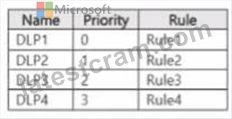
The DLP rules are configured as shown In the following table.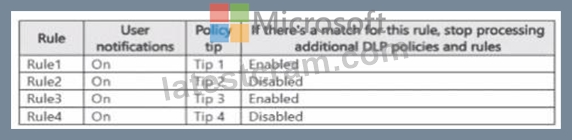
All the policies are assigned to Site1.
You need to ensure that if a user uploads a document to Site1 that matches all the rules, the user will be shown the Tip 2 policy tip. What should you do?
- A. Prevent additional processing of the policies if there is a match for Rule2
- B. Change the priority of DLP2 to 3.
- C. Enable additional processing of the policies if there is a match for Rule1.
- D. Change the priority of DLP2 to 0.
Answer: D
Explanation:
Current setup:
DLP1 (priority 0, Rule1) # Stop processing additional rules enabled # means if Rule1 matches, later rules (including Rule2 with Tip2) will never be evaluated.
Requirement: Ensure that if all rules match, the user sees Tip2 (Rule2's policy tip).
To fix this: Move DLP2 above DLP1 in priority (i.e., set DLP2 = priority 0). Then Rule2 will be evaluated first, and its policy tip (Tip2) will be displayed.
Why not others?
B). Prevent additional processing of the policies if there is a match for Rule2: That would stop processing later, but DLP1 would still block earlier due to its higher priority.
C). Change the priority of DLP2 to 3: That pushes it even lower, making it worse.
D). Enable additional processing for Rule1: Rule1 already has stop processing enabled. Changing that does not ensure Rule2 runs before Rule1, because priority is evaluated first.
Reference:
Microsoft Learn: Order of rule processing in DLP
# Policies with lower priority numbers run first, and "Stop processing" ends evaluation.
NEW QUESTION # 96
You have 4 Microsoft 565 E5 subscription that contains two Microsoft SharePoint Online sites named Site1 and Site2. You plan to configure a retention label named Labe1 and apply label1 to all the files in Site1 You need to ensure that two years after a file is created in Site1. the file moves automatically to Site2. How should you configure the Choose what happens after the retention period setting for Label1?
- A. Deactivate retention settings
- B. Start a disposition review
- C. Run a Power Automate flow
- D. Change the label
Answer: C
Explanation:
You want files in Site1 that are labeled with Label1 to automatically move to Site2 two years after creation.
In Microsoft Purview Retention Labels, under "Choose what happens after the retention period", the available options are:
Deactivate retention settings - Ends retention but does not move files.
Start a disposition review - Sends items to reviewers for approval (manual process, not auto-move).
Change the label - Applies a new retention label (but does not move files to another site).
Run a Power Automate flow - Executes an automated workflow such as moving the file to another SharePoint library or site, notifying users, or applying custom business processes.
Since the requirement is automatic movement of files from Site1 to Site2 after 2 years, the only valid choice is Run a Power Automate flow.
Reference:
Microsoft Learn: Actions after a retention period for retention labels
Quote: "For retention labels, you can choose to trigger a Power Automate flow when the retention period
NEW QUESTION # 97
DRAG DROP
You have a Microsoft 365 subscription that contains 20 data loss prevention (DLP) policies.
You need to identify the following:
# Rules that are applied without triggering a policy alert
# The top 10 files that have matched DLP policies
# Alerts that are miscategorized
Which report should you use for each requirement? To answer, drag the appropriate reports to the correct requirements. Each report may be used once, more than once, or not at all. You may need to drag the split bar between panes or scroll to view content.
NOTE: Each correct selection is worth one point.
Answer:
Explanation:
Explanation: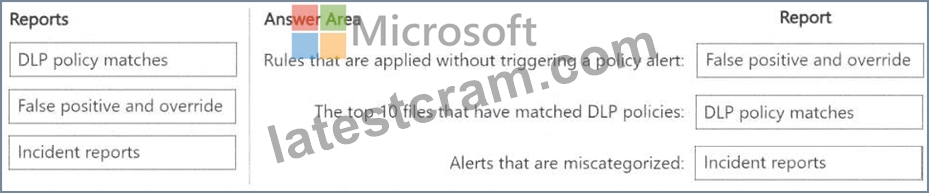
The False positive and override report helps identify rules that were applied but did not generate an actual policy alert, which means they were overridden or deemed false positives.
The DLP policy matches report provides details on files that matched DLP policies, including the top 10 files.
The Incident reports report helps analyze and review alerts, including those that may have been miscategorized.
NEW QUESTION # 98
......
100% Reliable Microsoft SC-401 Exam Dumps Test Pdf Exam Material: https://www.latestcram.com/SC-401-exam-cram-questions.html
Based on Official Syllabus Topics of Actual Microsoft SC-401 Exam: https://drive.google.com/open?id=1P_TVoIpFcfIGCgAVwqkhi4Jt5uuALLZQ
